[技巧] Windows通过注册表禁用或开启 服务 项
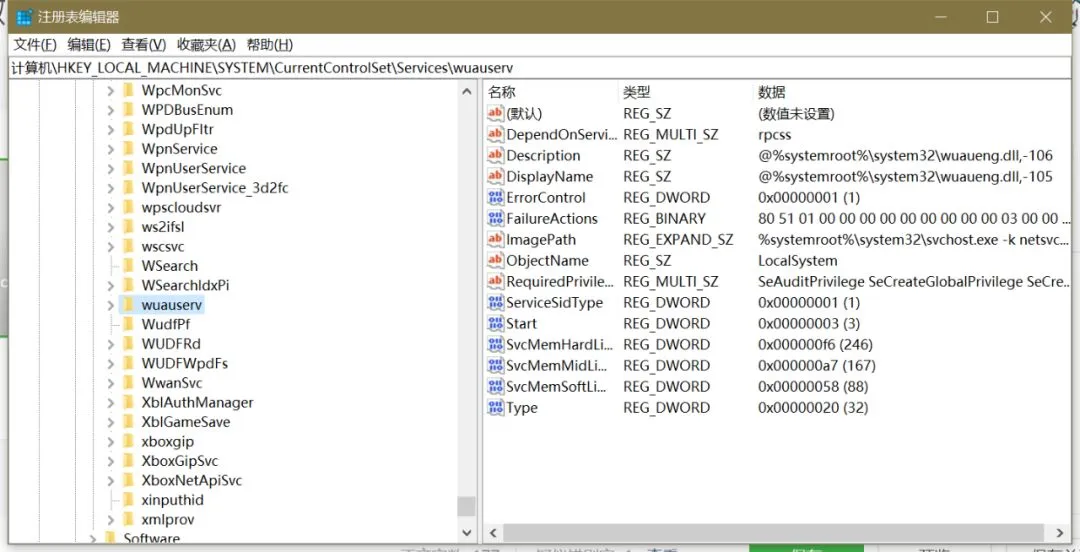
Windows通过注册表禁用或开启服务项。
在Windows操作系统中,服务项一般在以下注册表项中:
HKEY_LOCAL_MACHINE\SYSTEM\CurrentControlSet\Services
在注册表中禁用Windows Update服务为例:
我们都知道Windows Update的服务名称为wuauserv。
定位到注册表项:
RegKey=”HKEY_LOCAL_MACHINE\SYSTEM\CurrentControlSet\Services\wuauserv”
Value=”Start”
Type=”REG_DWORD”
Data=”4″
将”Start”的值改为4,就表示禁用这项服务。
数字意义说明:
1=自动(延迟启动)
2=自动
3=手动
4=禁用
这样,就方便在脱机状态下禁用各项服务。
欢迎 “ 转发、在看 ” 支持我们。
欢迎留言,我会尽可能回复。